Review Request Emails: Ready to Send Templates, Timing, and FTC Rules
Review Request Emails: Ready to Send Templates, Timing, and FTC Rules

A high-performing review request email is short, personal, and built around a single, frictionless call to action sent at the right moment after someone experiences your product or service. The biggest levers are the subject line, the sender identity, the CTA, and timing. One hard rule sits underneath all of it: you cannot condition an incentive on a positive review, a limit the FTC now enforces directly.
TL;DR:
- Trigger requests after delivery for ecommerce, meaningful usage for software, soon after service visits, and two to three weeks after durable goods arrive.
- Send a friendly reminder 3 to 5 days after the first request, then one final note 7 to 10 days later, and stop.
- The FTC bars incentives conditioned on positive reviews, while Google bars all incentivized reviews; neither policy allows filtering unhappy customers away from public review platforms.
- Track clicks through to reviews, tag results by campaign, and test one variable at a time for at least two weeks before choosing a winner.
Table of Contents
- The core anatomy of a high-converting review request email
- Ready-to-use templates and subject-line swipe file
- When to send the first request and how to sequence follow-ups
- Design and copy rules that keep requests out of spam folders
- Compliance: what the FTC and Google actually prohibit
- How to measure success and run small tests
- What tends to go wrong, and quick fixes
- Showing off the reviews you collect
- FAQ
- Sources
- Authoritative links and Zyff resources
The core anatomy of a high-converting review request email
Every part of a review request email either reduces friction or adds it. There is no neutral element. Once you see the email as a series of small decisions, each one measurable, templates stop feeling like guesswork and start feeling like a checklist.
The subject line decides whether the email gets opened at all. Short, specific lines that reference the product or the experience (“How’s your new jacket?”) tend to outperform generic ones (“We’d love your feedback”). Preview text is free real estate: use it to extend the subject line with a concrete reason to open, not to repeat the subject verbatim.
Sender identity matters almost as much as the subject line. An email from a real person’s name, or from the brand name the customer already recognizes from their order confirmation, reads as more trustworthy than a generic “noreply” address. If a founder or account manager already touched the order, their name on the review request closes a loop the customer remembers.
Personalization goes beyond “Hi [First Name].” Reference the specific order, product, or appointment: “your stay at [property]” or “your consultation on Tuesday” signals that the message is not a blast. At scale, this means pulling order or booking data into the send, not writing one email and hoping the merge fields fill in gracefully.
How you phrase the ask changes response quality, not just quantity. FTC guidance and the practitioners who follow it recommend framing the request as a way to help other shoppers decide, rather than a favor to the business. That altruistic framing, paired with one clear action, is recommended over emails that bundle a review ask with a discount code or a referral pitch.
CTA design is where most emails lose people. A single button or short link beats multiple options every time.
- Link the CTA straight to a pre-filled review form or a Google review link, not a generic homepage.
- Use one CTA per email. A second link (to a help center, a social page) can wait for a different message.
- Label the button with an action, not a noun: “Leave a quick review” instead of “Reviews.”
Plain text or lightly styled HTML tends to outperform heavy, image-dense templates for this specific ask. A review request is a personal moment, and an email that looks like a newsletter undercuts that. It also tends to land in the inbox rather than the promotions tab, since spam filters are more suspicious of image-heavy, link-stuffed HTML.
Pro Tip: Write the subject line last. Once the body is finished, you’ll know exactly what single benefit or detail is worth leading with.
Ready-to-use templates and subject-line swipe file
These templates are starting points. Swap in your product type, your sender name, and your actual review link before sending.
Short ecommerce template
Subject: How’s the [Product Name] working out?
Hi [First Name],
It’s been a week since your [Product Name] arrived. If you have a moment, we’d love to hear what you think. Your review helps other shoppers know what to expect before they buy.
[Leave a quick review] (button, links to pre-filled review form)
Thanks, [Sender Name]
Service or appointment template
Subject: Quick favor after your visit?
Hi [First Name],
Thanks for coming in on [date]. If your experience was a good one, a short review helps other people find us and know what to expect.
[Leave a review on Google] (button)
If something wasn’t right, just reply to this email, we’d rather hear it directly.
[Sender Name]
Google review-specific template
Subject: Got a moment for a Google review?
Hi [First Name],
If you were happy with [product/service], a quick Google review would help a lot. Click below, sign in with your Google account, and leave a few words about your experience.
[Leave a Google review] (link)
It only takes a moment.
[Sender Name]
For the Google-specific ask, a star rating alone isn’t enough. Google’s own guidance covers how to generate a direct review link or QR code and notes that reviewers must be signed into a Google account to post, worth mentioning if your customers ask why they’re prompted to log in.
Two-step follow-up sequence
- Friendly reminder (sent 3 to 5 days after the first request): “Just checking in, did our last email get buried? Here’s the link again: [review link].”
- Final nudge (sent later, if appropriate): “Last note from us on this, no pressure either way. If you have a minute: [review link].”
Subject-line swipe file
- Friendly: “How did we do?” / “Quick question about your order”
- Direct: “Leave a review” / “Rate your recent purchase”
- Urgent (use sparingly, only when a window is genuinely closing): “Last chance to share your thoughts”
- Audience-specific: “[First Name], how’s the [Product] treating you?” for ecommerce; “How was your appointment with [Team/Provider]?” for services.
Adapt each template by channel. A SaaS trial-to-paid conversion asks about the product experience; a restaurant asks about the visit; a B2B service asks the primary contact, not a whole distribution list. The structure stays the same: one subject, one personal detail, one CTA.
When to send the first request and how to sequence follow-ups
Timing is a hypothesis you test, not a rule you copy from a blog post. Start with a lifecycle trigger that matches how your customer actually experiences the product, then refine from there.
- Ecommerce: send after delivery confirmation, giving the customer time to actually use the product before judging it.
- B2B software: send after a meaningful usage milestone, such as a successful project, rather than right after signup.
- Services and appointments: send soon after the visit, while the experience is still fresh.
- Slow-moving or durable products (furniture, appliances): wait 2 to 3 weeks, and consider a second check-in at 60 days once the customer has lived with the item.
Send at a time that matches the recipient’s own clock rather than yours; recipient-local send-time scheduling is standard practice across major email platforms and tends to lift open rates compared with a single blast time zone.
For follow-ups, a friendly reminder 3 to 5 days after the first send, and a final nudge 7 to 10 days after that, covers most cases without becoming a nuisance. Slower-moving purchases can extend both windows by a few days.

Segment your list before you send. Engaged buyers and repeat customers respond well to a simple, direct ask. VIP or high-value customers deserve a slightly more personal note, ideally from an actual account contact. Low-engagement segments, people who haven’t opened recent emails, are better left out of the review push entirely rather than pushed harder, since a weak open rate there usually signals a list quality problem.
A basic test plan: run alternative subject lines against a split audience, keep the winner, then test one CTA wording change (button copy, not button color). Change one variable at a time so you can see what actually moved the result.
Design and copy rules that keep requests out of spam folders
The format of the email either supports the ask or fights it. Keep these rules close at hand when writing or designing.
- State the ask in the first sentence. Don’t warm up with company news or a thank-you paragraph first.
- Keep the full body concise. A review request is not the place for a long story.
- Use preview text as a short version of the CTA (“Share your thoughts”) rather than wasted space.
- Default to plain text or minimal HTML: a logo and a button are plenty, skip the hero image and footer graphics.
- Design for mobile first: one large, tappable button, or a single short link if you skip the button entirely.
Accessibility is often skipped and shouldn’t be. Use a readable font size in the rendered email, add alt text to any image, and make sure link text describes the destination (“Leave a review,” not “Click here”).
Pro Tip: Send yourself a test copy and read it on your phone before it goes to your list. If the CTA isn’t visible without scrolling, shorten the body.
Compliance: what the FTC and Google actually prohibit
As of late 2026, the FTC’s Consumer Reviews and Testimonials Rule prohibits offering an incentive that depends on a review being positive, such as a discount only if the customer leaves a positive review. Google separately prohibits all incentivized reviews, regardless of sentiment conditions. Avoid review gating, the practice of asking customers privately how their experience went and only routing happy customers to a public review platform. For a deeper policy briefing on what’s changed recently, this overview of Google’s review policy walks through what businesses need to adjust.
A short compliance checklist:
- Never offer a reward, discount, or entry contingent on a positive review.
- Never filter customers by sentiment before sending them to a review platform.
- Disclose any material connection (a free product, an affiliate relationship) wherever a review might appear.
- If you run a sweepstakes or thank-you gesture, make it available to anyone who leaves a review, positive or negative, and say so clearly.
Safer incentive structures exist: a generic sweepstakes entry for “anyone who shares feedback,” open regardless of star rating, with the terms disclosed in the email itself. For a fuller breakdown of what businesses are and aren’t allowed to ask for, see our guidance on review request rules.
How to measure success and run small tests
Key metrics include open rate (did the subject line work), click-to-review rate (did the CTA work), and review-conversion rate (did the click turn into an actual published review). Tracking only opens hides the real problem when a campaign underperforms, usually it’s the CTA or the landing step, not the subject line.
- Tag each review with its source campaign so you’re not guessing which email drove it.
- Test one variable at a time: subject line, then CTA wording, then send time.
- Give each test at least two weeks or enough volume to see a real difference before declaring a winner.
- Roll out the winning version to the full list, then start the next single-variable test.
What tends to go wrong, and quick fixes
The most common mistake is burying the ask after a thank-you message and a product recommendation. Readers skim; if the CTA isn’t visible in the first two lines, it gets missed. Another common mistake is sending the same email to everyone at a fixed time, ignoring segments and time zones.
Before: “We hope you’re enjoying your purchase! As a valued customer, we wanted to check in and see how things are going, and if you have a moment, we’d love any feedback you might have.” After: “How’s the [Product] working out? A quick review helps other shoppers decide. [Leave a review]”
Test the rewrite against your current template and see which one actually gets clicks.
— Ashok
Showing off the reviews you collect
Once the reviews start coming in, the next conversion lever is making sure visitors actually see them before they buy. A product page or landing page with visible star ratings and real customer quotes tends to build trust faster than a page with no social proof at all.
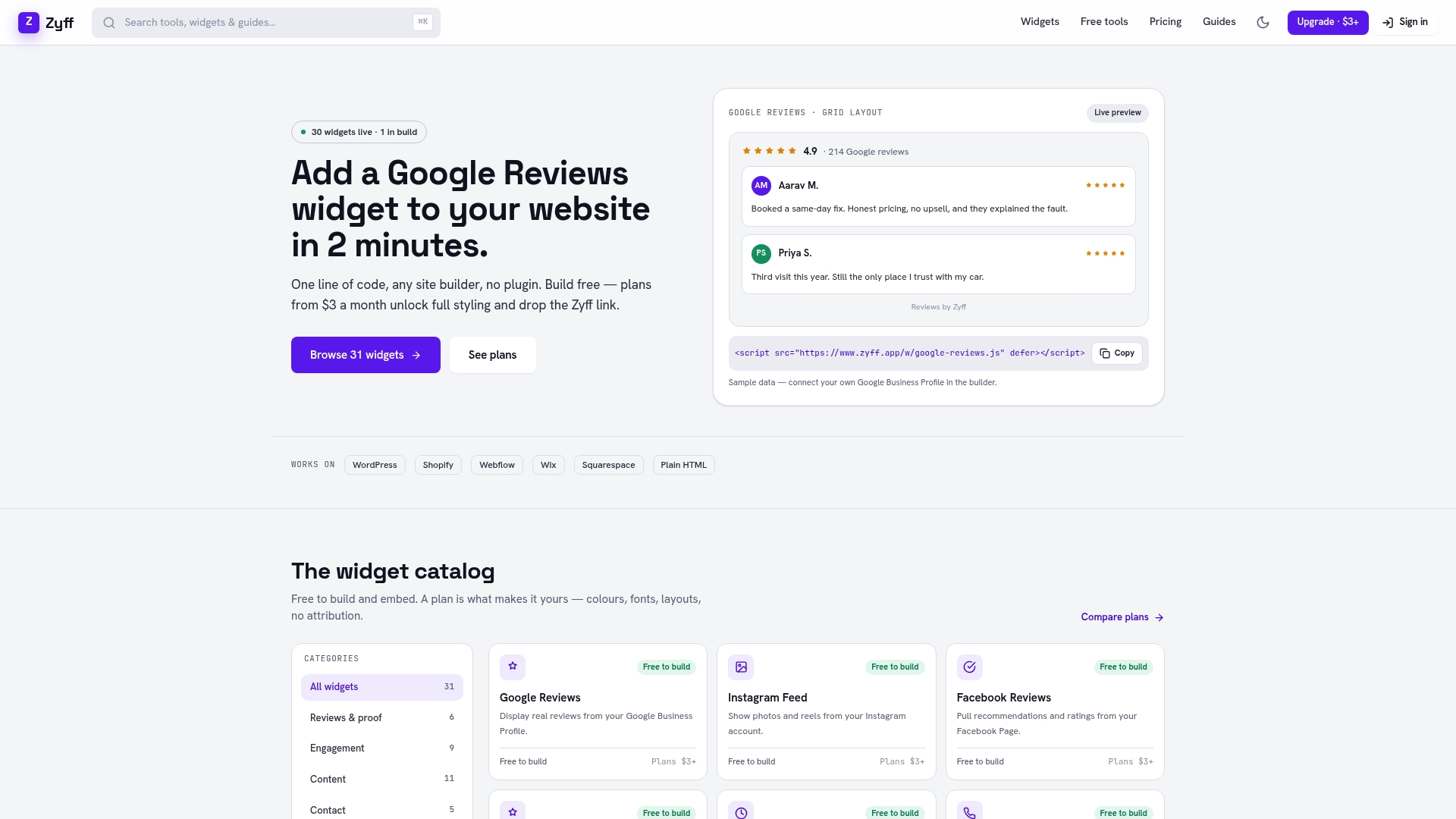
We built our Widget Builder to make that step simple: pull in reviews from Google, Facebook, Yelp, or Instagram and display them as a showcase widget on any page, with a simple embed and no development work. We also offer free tools for things like review badges and photo galleries if you want a lighter touch before committing to a full widget setup. Readers on Shopify or Webflow can start directly with our Shopify Google Reviews widget or Webflow Google Reviews widget. Plans start at $3 a month on the Basic tier if you need more saved widgets or custom styling, though the core widget builder is free to try first.
FAQ
How do you politely ask for a good review?
Frame the request as helping other customers decide, not as a favor to your business, and keep it to one clear action. Avoid tying any reward to a positive outcome, since that crosses into territory the FTC prohibits.
What is a good sample review message?
A strong sample message is short: name the product or service, state that feedback helps other shoppers, and include a single link or button to leave the review. The ecommerce and service templates earlier in this guide cover both formats.
How do I send an email for review?
Trigger the email after a meaningful moment, delivery, a completed appointment, or a usage milestone, rather than immediately after purchase. Keep the email concise with one CTA, and send a follow-up reminder later if there’s no response.
How do I ask for a review without sounding desperate?
Send once, follow up once, and stop. A friendly reminder later can be appropriate; repeated nudges across multiple channels may push people away instead of converting them.
Sources
Authoritative links and Zyff resources
For legal specifics, read the FTC’s final rule and Google’s review guidance directly, and confirm requirements for your own jurisdiction before launching a campaign.